8a-smart-card-bonus-points-01

How can I get bonus points for 8A Smart card generation?

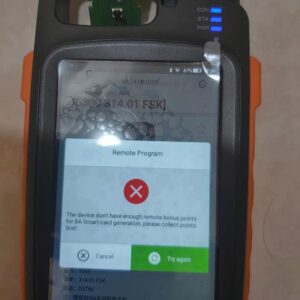
Xhorse VVDI Key Tool Max error: “The device don’t have enough remote bonus points for 8A smart card generation, please collect points first!”, please look at the following image.   You can see I have 0 bonus points. And the page to gift bonus points to others.   Solution: Please use the Xhorse remote (except XM Smart) to generate key and collect the pointRead More…

20063015935110244439000

How to exchange FBS3 smart key frequency between 315MHz and 433MH?

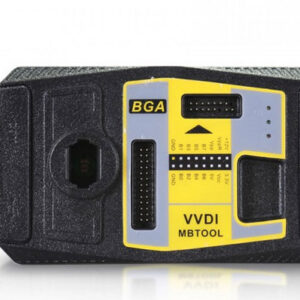
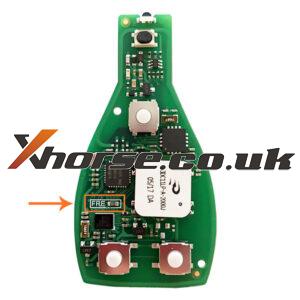
How to exchange FBS3 smart key frequency between 315MHz and 433MH? Method 1: If you have VVDI MB BGA TOOL, it is easy to change frequency in vvdi mb software (update software to latest version) Select Other Function-> Set key remote frequency / Update MB smart key You can set frequency between 315MHz and 433MHz Method 2: If without VVDI MB, you can change FBS3 keyRead More…

vvdi-key-tool-max-generate-super-chip-id47-3

How to Generate Super Chip ID47 using VVDI Key Tool Max?

Xhorse VVDI Key Tool Max is able to generate Super Chip ID47 successfully.   Put the super chip ID47 into the coil of VVDI Key Tool Max.   Tap “Generate Transponder” and then “ID47”   Tap “New 7938 chip” and then “Generate”.   Detecting transponder Generate Transponder Complete.   Then tap “ID47 Blank” and “Generate”. Read More…

test-xhorse-dolphin-xp005-battery-store-electricity -03

How to Test if Xhorse Dolphin XP005 Battery Store Electricity?

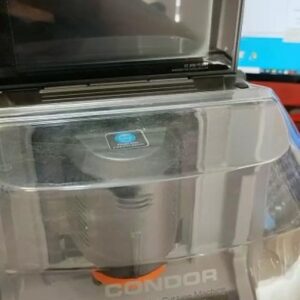
To test if Xhorse Dolphin XP005 battery storage has electricity or not, we should follow the 4 steps as below. Note: please recharge Dolphin XP005 for more than 1 hour before the procedure.   Step1. Loosen 4 screws on both side of base to disassemble the armrest. Step2. Lie Dolphin XP005 machine body on its one side, loosen the screws marked in pic to disassemble the base.
Read More…

VVDI-PROG-5.0.5

VVDI Prog V5.0.5 Free Update And Download

Xhorse VVDI PROG has been released the latest version V5.0.5 on July.29th,2021, 1.Free Download V5.0.5 VVDI PROG Software https://mega.nz/file/VI1i0RSK#DZPhvq3C7Kh7dvEm_7xtgOlUr3o2cuMKmVENkHaXNCg/url Password :123456 (Security in mega, 1.24GB  ) 2.V5.0.5 VVDI PROG Update Info * This version DON’t need update firmware + Add MPC5632M, MPC5633M, MPC5634M, options in <2-Read More…

vvdi-key-tool-def- not-back-to-normal-03

Xhorse VVDI Key tool “DEF” not back to normal solution

This article is available with the solution to the problem Xhorse vvdi Key tool “DEF” not back to normal.   Good to know: VVDI Key tool is off-production and replaced by VVDI Mini Key Tool, but they are still releasing updates.   How to back it normal, users share their experience: And just put it in English that returns to normal. Reinstall by computer,Read More…

replace-xhorse-elv-emulator-with-vvdi-mb-tool-6

How to Replace Xhorse ELV Emulator with VVDI MB Tool?

In case Mercedes Benz W204/ W207/ W212 EIS is damaged, not matter the ESL is damaged or NEC is locked, it’ll require to replace a new ESL emulator.   How to replace Xhorse ELV Emulator with VVDI MB Tool?   Check ESL Open the VVDI MB Tool to check ESL.   ESL Tools >> Read ESL data >> Check ESL damage It’ll show the ESL status. ESL is lockRead More…

solved-xhorse-vvdi-key-tool-plus-screen-stuck-01

How to do if Xhorse VVDI Key Tool Plus Pad Screen Stuck?

Sometimes, Xhorse VVDI Key Tool Plus Pad screen will be stuck due to operation mistake. How to solve the problem? Follow the solution below can let VVDI Key Tool Plus return to normal use. Steps 1. Go to restore factory setting. Home button >> System >> Reset Options Steps 2.Update software via mobile’s hotspot. Go to “Settings”to change WIFI to connect withRead More…

vvdi-key-tool-max-xn-remote-02

Fix VVDI Key Tool Max “Error! Only be programmed by XN series wireless remote”

VVDI Key Tool Max got error “Unsupport” “Error! Only be programmed by XN series wireless remote”. Look at the following images. I took out the battery and nothing happen.   Actually, the answer is on the screen use xn remote. https://www.xhorsetool.co.uk/wholesale/remote-keys-chips/xn-series-wireless-remotewith-transponder/ SA1783-5: XHORSE VVDI BE Key Pro HKSA1670-1: XHORRead More…