solved-condor-xc-mini-plus-black-screen-with-a-code-1

Solved! Condor XC-Mini black screen with a code

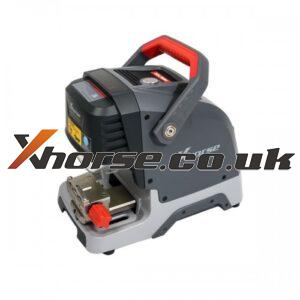
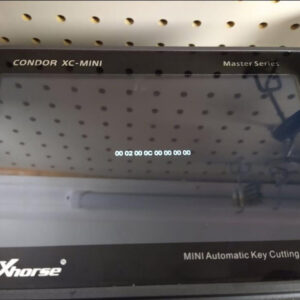
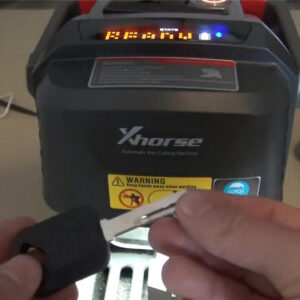
One customer had met a problem that his Xhorse Condor XC-Mini came with a black screen and a code in the middle. He said the Condor XC-Mini key cutting machine froze when he was selecting car year and model. So he kept turning it on and off, but the code was kept showing off. He provided an image of the issue. Solution Open the Xhorse upgrade kit to clear the error for 3 times, then re-uRead More…

how-to-calibrate-dolphin-xp-005-key-cutting-machine (1)

How to Calibrate Dolphin XP-005 Key Cutting Machine?

One customer had damaged the guides of his Xhorse Dolphin XP-005 when trying to update to the latest version. His Dolphin XP-005 failed, and lost the guides. He was asking how to calibrate his machine to restart cutting keys again. He also attached several pics for the issue. Xhorse engineer reply: Open Xhorse app on Machine Parameter function, follow the device calibration 3 steps in tuRead More…

how-to-solve-condor-xc-mini-plus-cut fail-13-issue (1)

How to solve Condor XC-Mini Plus”Cut Fail,13” issue?

One customer gave feedback that the Xhorse Condor XC-Mini Plus display “Cut Fail, 13 (Drill detected) (X=-8911, Y=-3001, Z=9424)” error when he was trying to cut keys. He attached an image and asked for help. Xhorse engineer reply: Please cleaning iron scraps as positions marked in red arrows. The problem was solved! Condor XC-Mini Plus key cutting machine can work as usual again. Read More…

how-to-use-mini-prog-to-read-eeprom-for-volvo-cem (1)

How to use Mini Prog to read EEPROM for Volvo CEM?

How to use Xhorse VVDI MINI Prog chip programmer to read EEPROM from Volvo CEM? Now I will make a quick explanation of the tutorial as below. This is the Xhorse MINI Prog, it is a blue handheld pen device with 2 buttons on the body. You can download the Xhorse app on the top by pressing the “MENU” button. Here is a Volvo CEM for the test, insert MINI Prog adapter to connect with it. Read More…

how-to-use-vvdi2-gt100-to-read-vw-engine (1)

How to use VVDI2 & GT100 to read VW engine?

Today I’m gonna make a tutorial test using these devices on the bench: Xhorse VVDI2 commander, GODIAG GT100 obd2 breakout box, VW BOSCH engine, and a computer. GODIAG GT100 is the latest auto tool for testing OBD2 protocol communication, which can be connected with a single module like ECU for diagnosis. Now let’s go to start: Connect the wires with the VW BOSCH engine according to the wRead More…

solved-binding-vvdi2-in-xhorse-app-issue (1)

Solved! Binding VVDI2 in Xhorse App Issue

Have got one customer’s feedback that his VVDI2 was failed when he was trying to bind VVDI2 & Condor XC-Mini Plus in Xhorse app. As his VVDI2 QR code can not be recognized in Xhorse app, it says:” QR code incorrect, please scanning the QR provide from upgrade kit!” Solution Open Xhorse Upgrade Kit software, click the Binding function on the top toolbar to bind VVDI2. The problRead More…

vvdi-bimtool-pro-bmw-cas4-key-programming (2)

VVDI BIMTool Pro BMW CAS4/CAS4+ Key Programming

This post is a quick tutorial of how to use Xhorse VVDI BIMTool Pro perform key programming for BMW CAS4/CAS4+ F Series. VVDI BIMTool Pro is a updated version of VVDI BMW tool, both are using same software. Steps Open Network And Sharing Center >> Change Adapter Settings >> Change to Local Area Connection. Open BMW TOOL V1.6.2 software >> Click “Connect”>&Read More…

xhorse-vvdi-key tool max-activating and binding-08

Activating and binding Xhorse VVDI Key Tool Max

Question: After receiving Xhorse VVDI Key Tool Max, how to activate and bind the device? Solution: you should do the following steps: 1. Click “Start to set” 2. Choose the available Wifi connection and enter the password, then click the tick, then click “Connect” 3. Enter your mobile phone number and click “send” 4. After security code has been sent, please enterRead More…

vvdi-mini-key-tool-activate-96bit-48-clone-tokens-faqs (1)

VVDI Mini KeyTool activate 96bit 48 clone & tokens FAQs

Xhorse received lots of questions about how to activate 96bit 48 clone & get tokens from customer who had bought VVDI MINI Key Tool. Here is the question collection most frequently asked and answered. Question 1 I had bounded VVDI MINI Key Tool in app, but can’t find 96bit 48 clone function in the Bonus Points Mall? Answer: Log in the Xhorse app and link the device to account, then Read More…

solved-vvdi-prog-download-error-unable-to-start-correctly-1

Solved! VVDI Prog Download Error:“unable to start correctly”

One of our customers ran into a problem after downloading Xhorse VVDI PROG software the latest version 4.9.6. “The application was unable to start correctly (0xc0000906). Click OK to close the application.” And he cannot execute VVDI PROG normally. Xhorse engineer replied to close antivirus software and redownload it again. The problem was solved! Tip: To make sure the application startRead More…